
What is Phishing?
Phishing is a type of scam where fraudsters impersonate a trustworthy entity in a message (email, text, call, etc.) to trick you into revealing sensitive information, allowing them to steal your funds or identity. Phishing is the most reported cybercrime according to the FBI’s Internal Crime Complaint Center with billions of dollars lost globally each year. These scams are tricky to spot because they exploit trust and urgency rather than technical vulnerabilities (like weak passwords). There are a number of different ways fraudsters can get your information. Some include: Email phishing: The most common form of phishing are fake emails that look real, designed to fool you into giving away your personal or financial information. Smishing (SMS phishing): A phishing attack that uses text messages to trick you into clicking a malicious link or sharing sensitive information. Vishing (voice phishing): A scam where attackers call you and pretend to be from legitimate companies or agencies to get you to share private information over the phone. Social media phishing: A type of phishing that uses fake accounts, posts, or direct messages on social media to lure users into revealing personal information or clicking harmful links. Bulk phishing: A type of phishing message that’s sent to hundreds or thousands of targets at once; these messages appear to come from trusted businesses or organizations that are common or broadly recognizable. Fraudsters use tactics, like phishing, to steal information, install malware on your devices, and other nefarious actions that can lead to account takeovers.Account Takeover
Account takeover is when a fraudster or cybercriminal takes control of your financial accounts by means of phishing. This can include online banking, mobile banking and/or debit/credit cards. All it takes for these scammers to access your account online is for you to reply to a text or email and then log to your account to verify your account transactions as requested. This simple act of logging in to your online account is how you are unwittingly providing your username and password. This type of fraud is especially dangerous because once inside your account, they can transfer funds, change passwords, update contact information or even open new accounts in your name, virtually locking you out of your finances. This type of fraud is scary, but there are some red flags you can look out for.Red Flags
Here are just some of the most common ways scammers may try to trick you, according to the FTC. Under the guise of a trusted institution, scammers will…- Report that they’ve noticed some suspicious activity, purchases, or log-in attempts
- Claim there’s a problem with your account or your payment information
- Insist you need to confirm some personal, financial, or log-in information
- Include an invoice you don’t recognize
- Request you click on a link to make a payment
- Say you’re eligible to register for a government refund
- Offer a coupon for free stuff
How to protect your accounts
Use strong and unique passwords: By creating strong, unique passwords, it makes it more difficult for scammers to access your accounts. Never repeat the same password twice. Enable two-factor authentication: Whenever possible, enable two-factor authentication on your accounts. This adds an extra layer of security that could stop a smishing attempt, but be sure to never share two-factor authentication codes with anyone. Never share verification codes or logins with anyone: Two-factor authentication codes and logins are the doors to your finances. Even if you trust someone like a family member, they could also fall victim to a phishing scam putting your finances at risk. This is what leads to account takeovers and is extremely important not to ever share verification codes or logins with anyone, even if you think it’s a verified source. Alaska Air Group Credit Union will never ask you to share your passwords or verification codes. Regularly monitor your accounts: Keep an eye on your financial accounts for suspicious activity. Review your monthly statements to ensure there aren’t any charges you didn’t make. Verify the Source: Before responding or clicking on any links in a text message, email, or phone call, verify the sender. If you’re unsure, contact the organization directly using a known, trusted phone number or website. Report Suspicious Messages: If you receive a suspicious text message, report it to relevant authorities, such as the Federal Trade Commission (FTC). Set Up Account Alerts in Online Banking: You can customize alerts to send you emails or SMS alerts for balances (i.e. if balance on an account is less than a specified amount), withdrawals (i.e. withdrawal over a specified amount), periodic balance alerts, debit card transaction alerts, and more. This not only is convenient so you can stay informed about your accounts, but it is great fraud prevention. To locate in mobile banking, click the three horizontal lines at the top of the app. Scroll down to “Settings” and select “Alert Settings”. There you will find alert options where you can set up your account specific alerts.
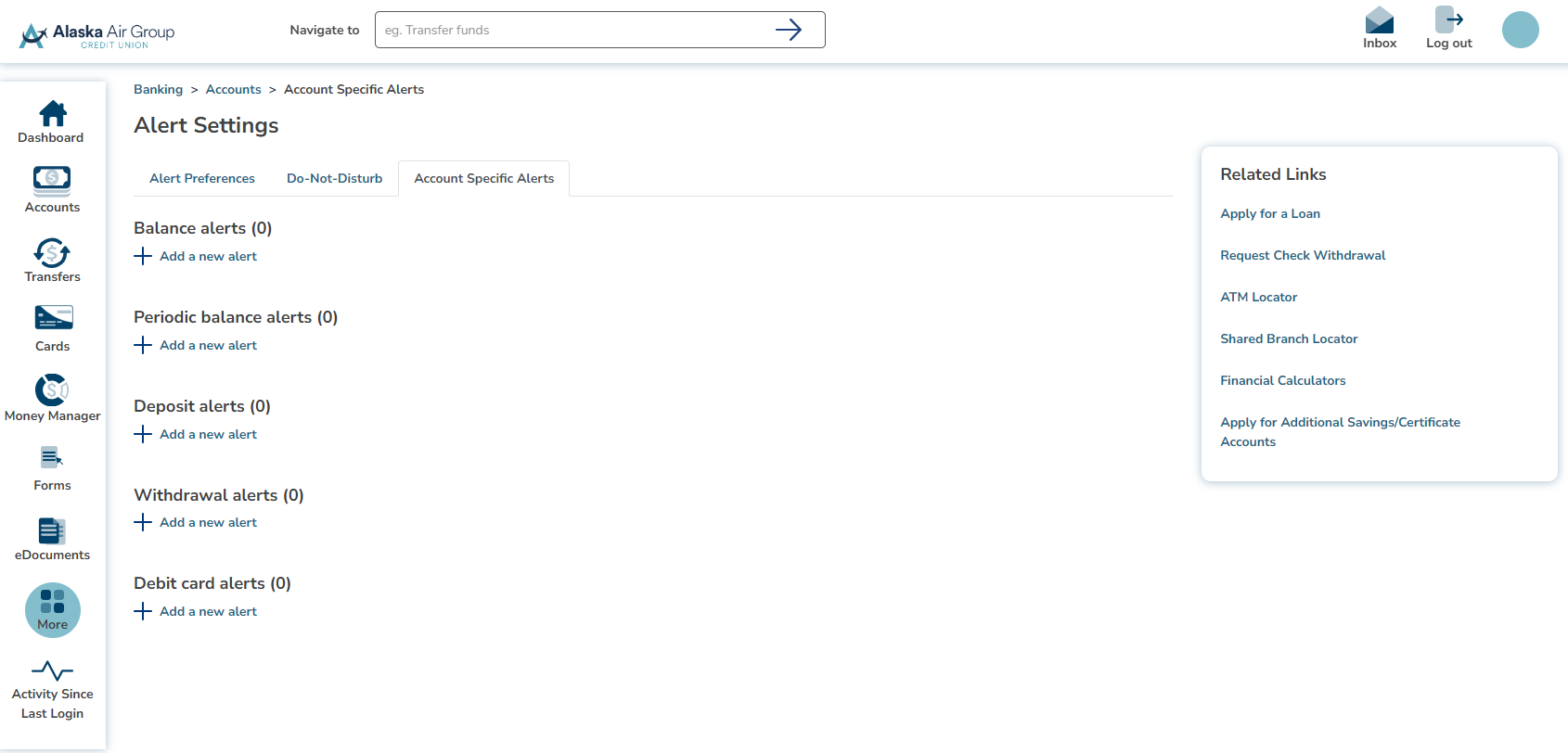 In online banking, find this feature by selecting “More” on the left toolbar, select “Alert Settings”, then toggle to “Account Specific Alerts”.
Fraud Alerts
To protect your account, we monitor your ATM and Debit Card transactions for potentially fraudulent activity. If we suspect suspicious activity, you will receive a phone call and/or email from our fraud department. If you have a valid cell phone number on file with us, you will also receive text alerts from our automated fraud detection system. To avoid purchase interruption, please make sure your email address and phone numbers are updated on your accounts, so you can be reached. If we can’t reach you, your card(s) may be blocked for your protection until you call to confirm the transaction(s). How it Works:- You simply reply “Yes” or “No”
- If you text “Yes”, your card will remain available for use.
- If you text “No” to tell us it’s not your purchase, we will text you a number for the fraud department to validate outstanding charges, prevent any further fraud, and block your card. Call AAGCU anytime during business hours at 206-824-9800 to start the process of getting you a new card.
Reporting Identity Theft
If you believe you have received a fraudulent message over the internet, report the message to the Internet Crime Complaint Center. If you believe you have been the victim of identity theft, you can call one of the three nationwide credit bureaus, Equifax, Experian and TransUnion. They have made it easier for identity theft victims. Now you need only call one of the three bureaus, and they’ll notify the others. Credit bureau phone numbers to place a fraud alert: Equifax – (800) 525-6285 Experian – (888) 397-3742 TransUnion – (800) 680-7289Additional Resources
Here are two websites with tools to help educate consumers on identifying and reporting fraud: Fraud can happen to anyone, but with knowing the warning signs and proper protections in place, you can reduce your risk of being next. Stay informed, stay alert!Was this blog helpful?
Thank you for reading! We value your feedback. Please let us know if you found this article helpful.